Pls bring the complete overview back? Saving and business and complete all on one page.
Chris
App Store
Use Tap to Pay on iPhone to take contactless payments without extra hardware. Also available on Android.

Use Tap to Pay on iPhone to take contactless payments without extra hardware. Also available on Android.
Use Tap to Pay on iPhone to take contactless payments without extra hardware. Also available on Android.
What bunq users say about banking with us.
Pls bring the complete overview back? Saving and business and complete all on one page.
Chris
App Store
I like it, it’s easy to use but keeps putting me on different payment plans which I need to resolve every month, take money then need pay for using card then I don’t also wheel is only once in month😩 but overall I’m happy enough, never breaks, don’t have issues unlike with revolut! Many people had issues with them and I was one of them! Anyway it’s easy and great app
Klintazimon
App Store
It is very comfortable bank to use (for everyday payments, for example).The security system is top notch. It is convenient to open a new account, and in general it is convenient to interact with the bank when necessary.
Milaya_Aleksasha
App Store
What bunq users say about banking with us.
Pls bring the complete overview back? Saving and business and complete all on one page.
Chris
App Store
I like it, it’s easy to use but keeps putting me on different payment plans which I need to resolve every month, take money then need pay for using card then I don’t also wheel is only once in month😩 but overall I’m happy enough, never breaks, don’t have issues unlike with revolut! Many people had issues with them and I was one of them! Anyway it’s easy and great app
Klintazimon
App Store
It is very comfortable bank to use (for everyday payments, for example).The security system is top notch. It is convenient to open a new account, and in general it is convenient to interact with the bank when necessary.
Milaya_Aleksasha
App Store
What bunq users say about banking with us.
Pls bring the complete overview back? Saving and business and complete all on one page.
Chris
App Store
I like it, it’s easy to use but keeps putting me on different payment plans which I need to resolve every month, take money then need pay for using card then I don’t also wheel is only once in month😩 but overall I’m happy enough, never breaks, don’t have issues unlike with revolut! Many people had issues with them and I was one of them! Anyway it’s easy and great app
Klintazimon
App Store
It is very comfortable bank to use (for everyday payments, for example).The security system is top notch. It is convenient to open a new account, and in general it is convenient to interact with the bank when necessary.
Milaya_Aleksasha
App Store
Accept physical cards, Apple Pay, and other digital wallets on your iPhone. No terminals or costly hardware needed.
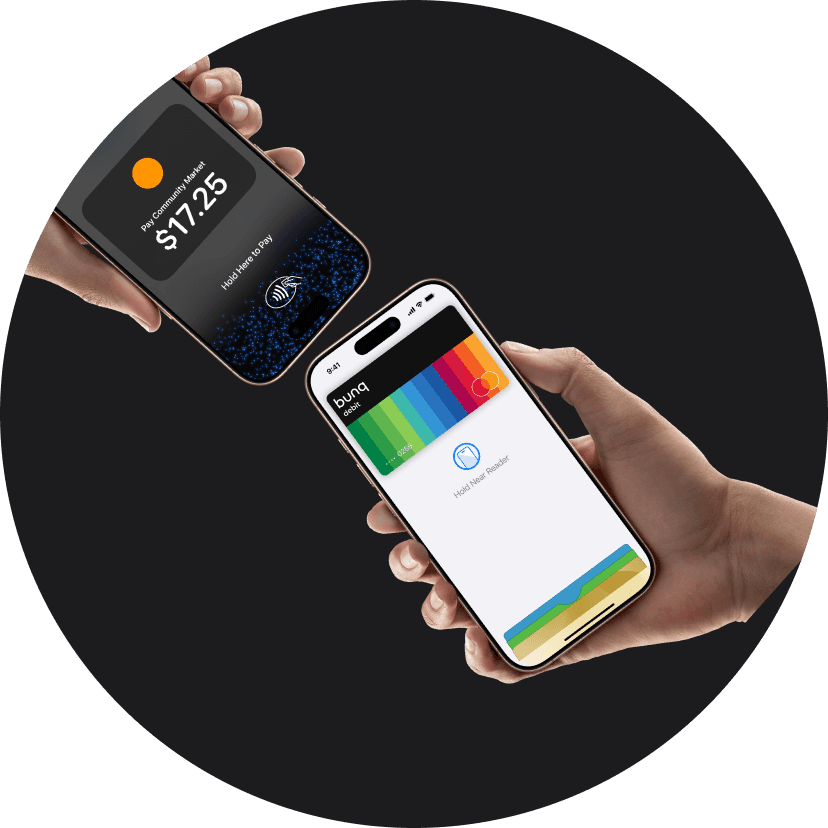
Accept physical cards, Apple Pay, and other digital wallets on your iPhone. No terminals or costly hardware needed.
Accept physical cards, Apple Pay, and other digital wallets on your iPhone. No terminals or costly hardware needed.


Take a contactless payment in four steps from your bunq app.
Tap Request, enter the amount, and choose Tap to Pay on iPhone.
Hold your iPhone ready for the customer.
The customer holds their card or device near the top of your iPhone.
When you see the checkmark, the payment is processing.
Take a contactless payment in four steps from your bunq app.
Tap Request, enter the amount, and choose Tap to Pay on iPhone.
Hold your iPhone ready for the customer.
The customer holds their card or device near the top of your iPhone.
When you see the checkmark, the payment is processing.
Take a contactless payment in four steps from your bunq app.
Tap Request, enter the amount, and choose Tap to Pay on iPhone.
Hold your iPhone ready for the customer.
The customer holds their card or device near the top of your iPhone.
When you see the checkmark, the payment is processing.
Try any plan free for 30 days. After that, you pay for your chosen plan unless you change or cancel it. Cancel anytime, for free.
€23.99
/month
Foreign Currencies, higher limits, and tools for cross-border work.
Try any plan free for 30 days. After that, you pay for your chosen plan unless you change or cancel it. Cancel anytime, for free.
€23.99
/month
Foreign Currencies, higher limits, and tools for cross-border work.
Try any plan free for 30 days. After that, you pay for your chosen plan unless you change or cancel it. Cancel anytime, for free.
€23.99
/month
Foreign Currencies, higher limits, and tools for cross-border work.
Who can use it, fees, supported payment methods, and plan requirements.
On your bunq.me page, payers can use iDEAL or Wero, Bancontact, or debit and credit cards. Limits and card fees are set out in the help article linked below.
You need a verified Personal account, directors aged 18+, a legitimate business registered in a supported country, an accepted legal form, and only one bunq Business Account per entity.
Country-specific rules and documents may apply, check the help article for your market.
Tap to Pay lets Business users accept in-person card payments with your phone. A transaction fee applies; check the Tap to Pay section in your app for current rates.
Yes. Active Company Cards can be added to Apple Pay and Google Pay from the bunq app, the same way as your other bunq cards.
Verified bunq Business users in supported countries can accept contactless card payments with Tap to Pay on a compatible iPhone or Android device, with no extra hardware. Some merchant categories are excluded.
Open Profile → Support for 24/7 in-app chat. For urgent card or access issues, call the SOS line shown in the app (+31 20 808 3666). You can also email support@bunq.com from your linked address.
Who can use it, fees, supported payment methods, and plan requirements.
On your bunq.me page, payers can use iDEAL or Wero, Bancontact, or debit and credit cards. Limits and card fees are set out in the help article linked below.
You need a verified Personal account, directors aged 18+, a legitimate business registered in a supported country, an accepted legal form, and only one bunq Business Account per entity.
Country-specific rules and documents may apply, check the help article for your market.
Tap to Pay lets Business users accept in-person card payments with your phone. A transaction fee applies; check the Tap to Pay section in your app for current rates.
Yes. Active Company Cards can be added to Apple Pay and Google Pay from the bunq app, the same way as your other bunq cards.
Verified bunq Business users in supported countries can accept contactless card payments with Tap to Pay on a compatible iPhone or Android device, with no extra hardware. Some merchant categories are excluded.
Open Profile → Support for 24/7 in-app chat. For urgent card or access issues, call the SOS line shown in the app (+31 20 808 3666). You can also email support@bunq.com from your linked address.
Who can use it, fees, supported payment methods, and plan requirements.
On your bunq.me page, payers can use iDEAL or Wero, Bancontact, or debit and credit cards. Limits and card fees are set out in the help article linked below.
You need a verified Personal account, directors aged 18+, a legitimate business registered in a supported country, an accepted legal form, and only one bunq Business Account per entity.
Country-specific rules and documents may apply, check the help article for your market.
Tap to Pay lets Business users accept in-person card payments with your phone. A transaction fee applies; check the Tap to Pay section in your app for current rates.
Yes. Active Company Cards can be added to Apple Pay and Google Pay from the bunq app, the same way as your other bunq cards.
Verified bunq Business users in supported countries can accept contactless card payments with Tap to Pay on a compatible iPhone or Android device, with no extra hardware. Some merchant categories are excluded.
Open Profile → Support for 24/7 in-app chat. For urgent card or access issues, call the SOS line shown in the app (+31 20 808 3666). You can also email support@bunq.com from your linked address.
Start accepting in-person payments with Tap to Pay on iPhone.
Start accepting in-person payments with Tap to Pay on iPhone.
Start accepting in-person payments with Tap to Pay on iPhone.
More guides on business banking with bunq.
More guides on business banking with bunq.
More guides on business banking with bunq.